---
notionId: "1d0f0d27c79880ada614d61005fd4b25"
product: "smarter-voice"
cluster: "voicemail-and-logs"
intent: "smarter-voice.call-logs"
docSlug: "call-logs"
task: "Read call logs in Smarter Voice"
title: "Read call logs in Smarter Voice | VirtualPBX"
meta_description: "Call Logs allow you to view all calls to and from your business number and users. Utilize to track metrics, as well as troubleshoot your calls on the spot."
answer: "Call Logs allow you to view all calls to and from your business number and users. Utilize to track metrics, as well as troubleshoot your calls on the spot."
audience: "admin"
updated: "2026-09-21"
legacy: ["call-logs"]
headings: [{"depth":2,"text":"Call Logs Page","id":"call-logs-page"},{"depth":3,"text":"Call Log Definitions","id":"call-log-definitions"}]
lint: ["meta-answer","answer-first"]
---

Table of Contents

## Call Logs Page

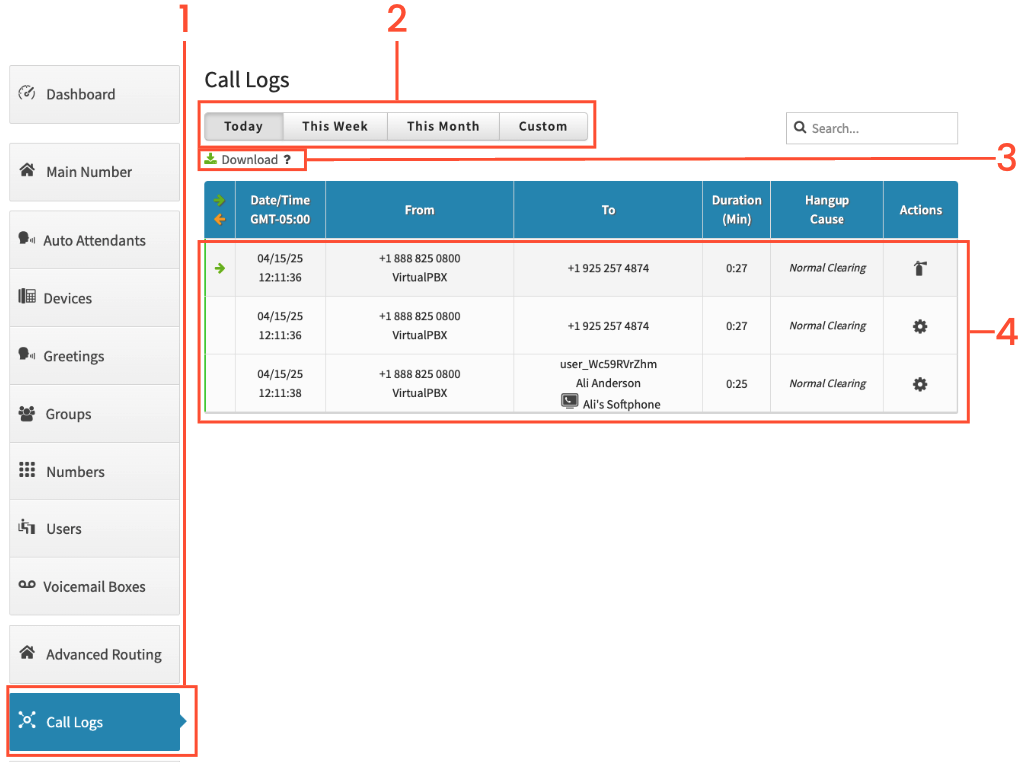
You can access these call logs by logging in to your VirtualPBX account and clicking Call Logs. 

Please note: 50 initial records will populate. Scrolling to the bottom, or clicking the button at the bottom will populate 50 more each time until all have fully populated.

<img src="/assets/call-logs/image.png" width="1034" height="762" alt="Call Logs Page" loading="lazy" decoding="async">

<ol>
<li><p>Start by clicking on Call Logs on the left</p>
</li>
<li><p>Choose either Today, This Week, This Month or Custom. You will see the call logs for the chosen time frame</p>
</li>
<li><p>You have the option of downloading the call logs, which downloads the information as a . CSV file</p>
</li>
<li><p>You can click on a call to expand the call to see which devices the call routed to, if any.</p>
</li>
</ol>

### Call Log Definitions

When downloading the call logs you will get 25 columns and each row is a call.  The 25 columns are:

ID: This contains the month and year, followed by the call\_id

Call\_id: The specific identification number for a specific call.

Caller\_id\_number: The phone number of the inbound caller.

Caller\_id\_name: The CallerID Name (CNAM) associated with the number.

Callee\_id\_number: The phone number the inbound caller dialed, ie one of your VirtualPBX phone numbers.

Callee\_id\_name: The CallerID Name associated with the callee phone number.

Duration\_second: The length of the call measured in seconds.

Billing\_seconds: Amount of time that a call will be billed.

Timestamp: Refer to column labeled DateTime

Hangup\_cause: Why a call ended. Most should end with Normal Clearing.

Common Hangup Causes:

<ul>
<li><p>Normal Clearing: One of the people on the call hung up, ending the call normally.</p>
</li>
<li><p>User Busy: The called party is unable to accept another call. This could be because the callee is on another call or it can indicate a network issue.</p>
</li>
<li><p>Normal Temporary Failure: A short-term temporary network issue. The next attempt may connect properly.</p>
</li>
<li><p>Recovery on Timer Expire: Usually a result of a NAT/VPN or network issue.</p>
</li>
<li><p>Originator Cancel: The person initiating the call ended the call before it was completed.</p>
</li>
<li><p>Lose Race: Typically shows up when a call goes to a ring group or user with Follow Me enabled. The device(s) that did not pick up the inbound call will have this hang-up cause.</p>
To: The phone number that a call went to.
From: The phone number where the call originated from.
Direction: Which way a call is going (i.e inbound or outbound).
Request: The receiving devices/phone numbers that were rung.</li>
<li><p>A user_xxxxxx indicates a VoIP device was attempted to be contacted via one of your users, agents, or pro agents.</p>
</li>
<li><p>A +15555555555@xxxxx.sip.virtualpbx.net indicates a cell phone, or North American phone number was contacted via one of your users, agents, or pro agents.</p>
</li>
</ul>

Dailed\_number: Phone number the call came to.

Calling\_from: The phone number the call came from.

Datetime: Date and time of the call.

Unix\_timestamp: Number of seconds since January 1st, 1970.

Rfc\_1036: Date/time of the call based on GMT.

ISO:8601: Date of the call.

Iso\_8601\_combined: Engineers of VirtualPBX use this to dig into details if needed.

Rate: Engineers of VirtualPBX use this to dig into details if needed.

Bridge\_id: Not usually applicable to customers. Engineers of VirtualPBX use this to dig into details if needed.

Media\_server: Specific server the call routed through.

Interaction\_id: Not usually applicable to customers. Engineers of VirtualPBX use this to dig into details if needed.
