

Help Center / Developer / Business SMS / VirtualText
Business SMS
VirtualText in the API
The VirtualText API connects an external platform to business texting. Authenticate with the authorization header, then send an SMS or MMS and receive messages through a webhook. The webhook event carries the inbound message, and a send request delivers an outbound message to a number on the account. Use this API when another system should read or write those texts instead of the inbox alone.
On this page
About VirtualText API
VirtualText API is intended for integrating external platforms and business tools.
Our API allows you to send outbound SMS and MMS messages, list, create and update contacts as well as list. Please read the documentation below for implementing the API.
Authentication
Authorization Header
All API requests require an Authorization header that includes a valid Bearer token composed of an Account User ID and Access Token.
| Type | Value |
|---|---|
| Authorization | Bearer accountUid:accessToken |
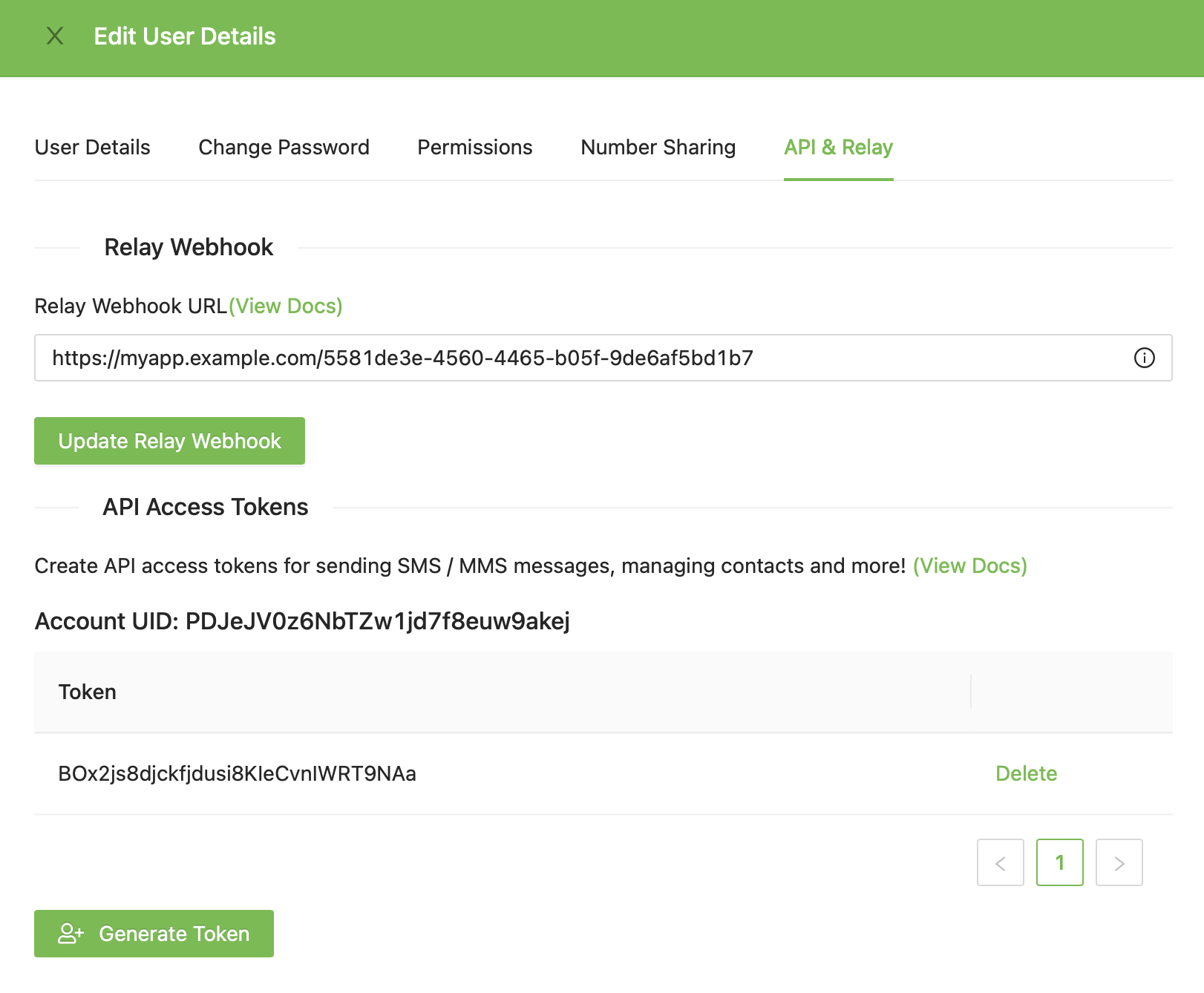
Receiving SMS and MMS
Relay is a feature that enables the synchronization of messages that are sent or received to a user’s phone number with external systems like CRMs, Support Desk software, and more.
In VirtualText under Integrations, a webhook can be configure to relay all SMS and MMS messages received by a user to external systems.
Webhook Event Data
Relay sends a POST to the Relay Webhook URL when a message is sent or received. The POST body is formatted as such:
{
	MessageID: 'abc123xyz', // the unique message ID
	ConversationID: "xyz321cba", //the unique contact ID
	ToNumber: "+15555555555", //the number the message was sent to
	FromNumber: "+13333333333", //the number the message was sent from
	MessageBody: "Hello, world!", //the message body
	MessageDirection: "in", //the message direction (either "in" or "out")
	TextableUserID: "lmnopqrstuv", //the user id of the account that sent or received the message,
	ContactName: "John Doe", //the Full Name property of the contact,
	ContactEmail: "john.doe@gmail.com", //the e-mail address of the contact (if available),
	Media: ["https://sampleUrl.com/URL1","https://sampleUrl.com/URL2"], //all MMS attachment urls associated with the message (if any)
}
Sending SMS and MMS
You may send individual SMS and/or MMS message using this API endpoint.
API
POST https://public-api.virtualtext.com/api/send
Headers
| Type | Value |
|---|---|
| Authorization | Bearer accountUid:accessToken |
| Content-type | application/json |
Arguments
| Name | Type | Description |
|---|---|---|
| to | String | This should be an e.164 formatted phone number (e.g. +15555555555). |
| from | String | This should the e.164 formatted phone number assigned to the user (e.g. +15555555555). |
| message | String | This is the message body as a string. |
| media | Array | (Optional) This should be an array of media files as publicly available URLs. |
| sendStatus | String | (Optional) Set to "sent". This is useful if you interact directly with your carrier API's but want to store the message in the conversation history. When set, we will NOT send this through the carrier APIs and assume that you already have. |
Example Request Body:
{
"to":"+15555555555"
"from":+14444444444
"message": "Hello, world!",
"media": [
"https://picsum.photos/200/300" ]
}
Example Response Body:
Success - HTTP 200
{
"status": "true"
}
Failure - HTTP 400
{
"errors":['Missing parameter '[fieldName]' (e.g. accountUid, accessToken, etc.).', ]
}
Create Contact
Creates an contact in VirtualText for the authenticated user.
API
POST https://virtualtext-txb.textable.app/api/contacts
Headers
| Type | Value |
|---|---|
| Authorization | Bearer accountUid:accessToken |
| Content-type | application/json |
Arguments
| Name | Type | Description |
|---|---|---|
| phoneNumber | String | Required. This should be an e.164 formatted phone number (e.g. +15555555555). |
| fullName | String | (Optional) If not set, fullName will be set to the phoneNumber value. |
| String | (Optional) |
Example Request Body:
{
"phoneNumber":"+15554442222",
"fullName":"John Doe",
"email": "john.doe@gmail.com"
}
Example Response Body:
Success - HTTP 200
{
"id": "xyzabc123"
"fullName": "John Doe"
"phoneNumber": "+15554442222"
"email": "john.doe@gmail.com"
}
Failure - HTTP 400
{
"errors":['Missing parameter '[fieldName]' (e.g. accountUid, accessToken, etc.).', ]
}
Update Contact
Updates a contact.
POST https://public-api.virtualtext.com/api/contacts/\{id\}
Headers
| Type | Value |
|---|---|
| Authorization | Bearer accountUid:accessToken |
| Content-type | application/json |
Arguments
| Name | Type | Description |
|---|---|---|
| phoneNumber | String | Required. This should be an e.164 formatted phone number (e.g. +15555555555). |
| fullName | String | (Optional) If not set, fullName will be set to the phoneNumber value. |
| String | (Optional) |
Example Request Body:
{
"phoneNumber":"+15554442222",
"fullName":"John Doe",
"email": "john.doe@gmail.com"
}
Example Response Body:
Success - HTTP 200
{
"id": "xyzabc123"
"fullName": "John Doe"
"phoneNumber": "+15554442222"
"email": "john.doe@gmail.com"
}
Failure - HTTP 400
{
"errors":['Missing parameter '[fieldName]' (e.g. accountUid, accessToken, etc.).', ]
}
Get Contact
Get a contact.
GET https://public-api.virtualtext.com/api/contacts/\{id\}
Headers
| Type | Value |
|---|---|
| Authorization | Bearer accountUid:accessToken |
| Content-type | application/json |
Example Response Body:
Success - HTTP 200
{
"id": "xyzabc123"
"fullName": "John Doe"
"phoneNumber": "+15554442222"
"email": "john.doe@gmail.com"
}
Failure - HTTP 400
{
"errors":['Missing parameter '[fieldName]' (e.g. accountUid, accessToken, etc.).', ]
}
Get Contact List
Gets a list of contact contact for the authenticated user.
GET https://public-api.virtualtext.com/api/contacts
Headers
| Type | Value |
|---|---|
| Authorization | Bearer accountUid:accessToken |
| Content-type | application/json |
Example Response Body:
Success - HTTP 200
{
    "contacts":[
    {
        "id": "xyzabc123"
        "fullName": "John Doe"
        "phoneNumber": "+15554442222"
        "email": "john.doe@gmail.com"
    },
    ...
    ]
}
Failure - HTTP 400
{
"errors":['Missing parameter '[fieldName]' (e.g. accountUid, accessToken, etc.).', ]
}
← Previous
Next →