

Help Center / Smarter Voice / Voicemail and logs / Read call logs
Voicemail and logs
Read call logs in Smarter Voice
Call Logs allow you to view all calls to and from your business number and users. Utilize to track metrics, as well as troubleshoot your calls on the spot.
On this page
Table of Contents
Call Logs Page
You can access these call logs by logging in to your VirtualPBX account and clicking Call Logs.
Please note: 50 initial records will populate. Scrolling to the bottom, or clicking the button at the bottom will populate 50 more each time until all have fully populated.
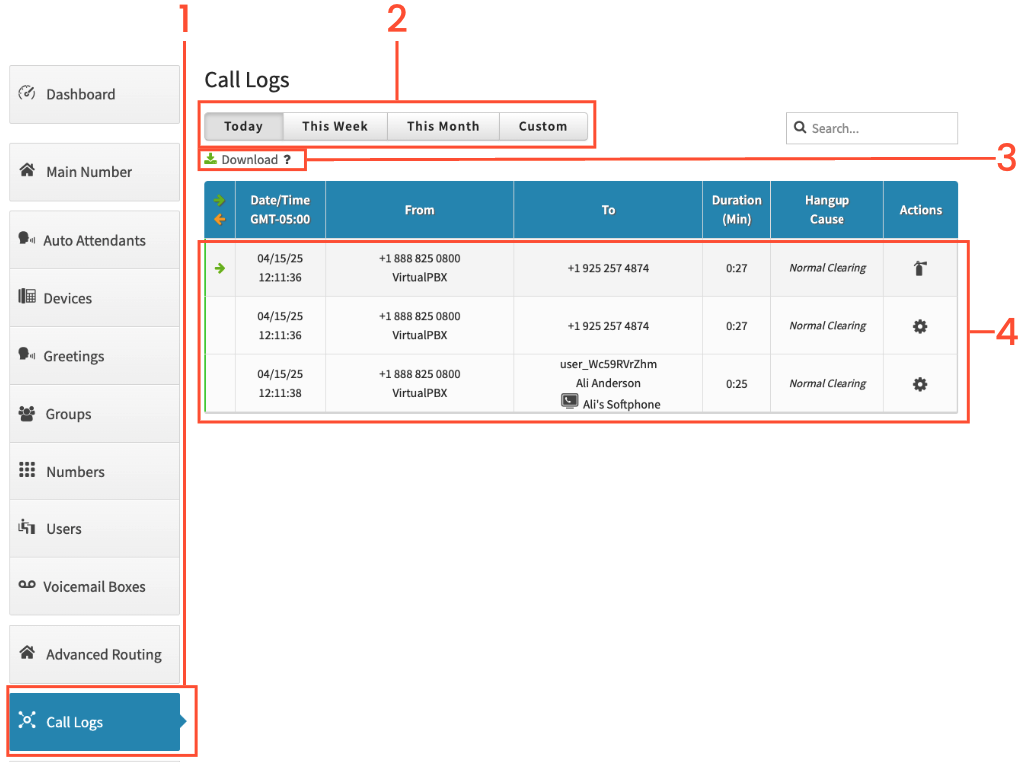
Start by clicking on Call Logs on the left
Choose either Today, This Week, This Month or Custom. You will see the call logs for the chosen time frame
You have the option of downloading the call logs, which downloads the information as a . CSV file
You can click on a call to expand the call to see which devices the call routed to, if any.
Call Log Definitions
When downloading the call logs you will get 25 columns and each row is a call. The 25 columns are:
ID: This contains the month and year, followed by the call_id
Call_id: The specific identification number for a specific call.
Caller_id_number: The phone number of the inbound caller.
Caller_id_name: The CallerID Name (CNAM) associated with the number.
Callee_id_number: The phone number the inbound caller dialed, ie one of your VirtualPBX phone numbers.
Callee_id_name: The CallerID Name associated with the callee phone number.
Duration_second: The length of the call measured in seconds.
Billing_seconds: Amount of time that a call will be billed.
Timestamp: Refer to column labeled DateTime
Hangup_cause: Why a call ended. Most should end with Normal Clearing.
Common Hangup Causes:
Normal Clearing: One of the people on the call hung up, ending the call normally.
User Busy: The called party is unable to accept another call. This could be because the callee is on another call or it can indicate a network issue.
Normal Temporary Failure: A short-term temporary network issue. The next attempt may connect properly.
Recovery on Timer Expire: Usually a result of a NAT/VPN or network issue.
Originator Cancel: The person initiating the call ended the call before it was completed.
Lose Race: Typically shows up when a call goes to a ring group or user with Follow Me enabled. The device(s) that did not pick up the inbound call will have this hang-up cause.
To: The phone number that a call went to. From: The phone number where the call originated from. Direction: Which way a call is going (i.e inbound or outbound). Request: The receiving devices/phone numbers that were rung.A user_xxxxxx indicates a VoIP device was attempted to be contacted via one of your users, agents, or pro agents.
A +15555555555@xxxxx.sip.virtualpbx.net indicates a cell phone, or North American phone number was contacted via one of your users, agents, or pro agents.
Dailed_number: Phone number the call came to.
Calling_from: The phone number the call came from.
Datetime: Date and time of the call.
Unix_timestamp: Number of seconds since January 1st, 1970.
Rfc_1036: Date/time of the call based on GMT.
ISO:8601: Date of the call.
Iso_8601_combined: Engineers of VirtualPBX use this to dig into details if needed.
Rate: Engineers of VirtualPBX use this to dig into details if needed.
Bridge_id: Not usually applicable to customers. Engineers of VirtualPBX use this to dig into details if needed.
Media_server: Specific server the call routed through.
Interaction_id: Not usually applicable to customers. Engineers of VirtualPBX use this to dig into details if needed.